Module 1 Important Questions (JAVA)
1. Describe the significant concepts in OOPs.
Key Features of Object-Oriented Programming
The four main features of Object-Oriented Programming are:
- Encapsulation
- Inheritance
- Polymorphism
- Abstraction
1. Encapsulation
Wrapping data and methods together + hiding data using private.
class BankAccount {
    private double balance;  // Hidden from outside

    // Controlled access through methods
    public void deposit(double amount) {
        if (amount > 0) {
            balance += amount;
        }
    }

    public double getBalance() {
        return balance;
    }
}
2. Inheritance
One class acquires properties of another class.
class Animal {
    void eat() {
        System.out.println("Eating...");
    }
}

class Dog extends Animal {  // Dog inherits Animal
    void bark() {
        System.out.println("Barking...");
    }
}
3. Polymorphism
Same method behaves differently based on context.
- Compile-time (Overloading): Same method name, different parameters
- Runtime (Overriding): Child class redefines parent’s method
class Calculator {
    // Overloading - same name, different parameters
    int add(int a, int b) { return a + b; }
    int add(int a, int b, int c) { return a + b + c; }
}
4. Abstraction
Hiding implementation details, showing only functionality.
abstract class Shape {
    abstract void draw();  // What to do (no how)
}

class Circle extends Shape {
    void draw() {
        System.out.println("Drawing circle");  // How to do
    }
}
2. Explain the primitive data types available in Java? Specify memory requirement and range of each.
Data Types in Java
Java has two types of data types:
Primitive Data Types (8 types)
| Type | Size | Example | Default |
|---|---|---|---|
byte | 1 byte | byte b = 100; | 0 |
short | 2 bytes | short s = 1000; | 0 |
int | 4 bytes | int i = 50000; | 0 |
long | 8 bytes | long l = 100000L; | 0L |
float | 4 bytes | float f = 3.14f; | 0.0f |
double | 8 bytes | double d = 3.14159; | 0.0d |
char | 2 bytes | char c = 'A'; | ’\u0000’ |
boolean | 1 bit | boolean b = true; | false |
Non-Primitive (Reference) Data Types
- String, Arrays, Classes, Interfaces
Type Casting
Type casting = Converting one data type to another.
1. Implicit Casting (Widening) - Automatic
// Smaller to larger type - automatic
int num = 100;
double d = num;  // int → double (automatic)
System.out.println(d);  // Output: 100.0
2. Explicit Casting (Narrowing) - Manual
// Larger to smaller type - manual (may lose data)
double d = 9.78;
int num = (int) d;  // double → int (manual)
System.out.println(num);  // Output: 9 (decimal lost!)
Order: byte → short → int → long → float → double
3. Explain the statement “public static void main (String args [])”.
public static void main(String args[]) is the main method in a Java program and serves as the starting point of execution. The keyword public allows the JVM to access the method, static lets it run without creating an object of the class, and void means the method does not return any value. The word main is the predefined method name that the JVM looks for when starting a program. String args[] is an array used to store command-line arguments passed to the program when it is executed.
4. Discuss the structure of Java Program.
A Java program is organized into classes and methods. Every Java program must contain at least one class, and the program execution usually starts from the main() method. A class can contain variables, methods, constructors, and other code needed to perform specific tasks. The basic structure includes optional package and import statements, a class declaration, and the main() method where the program’s instructions are written.
class Hello {
    public static void main(String[] args) {
        System.out.println("Hello World");
    }
}
In this example, Hello is the class name, main() is the starting method of the program, and System.out.println() displays the message on the screen.
5. Explain any two types of looping statements with syntax and example.
1. for Loop
A for loop is used when the number of iterations is known in advance. It consists of initialization, condition, and update expressions in a single statement.
Syntax:
for(initialization; condition; update) {
    // statements
}
Example:
for(int i = 1; i <= 5; i++) {
    System.out.println(i);
}
This loop prints the numbers 1 to 5.
2. while Loop
A while loop is used when the number of iterations is not known beforehand. The loop continues as long as the condition remains true.
Syntax:
while(condition) {
    // statements
}
Example:
int i = 1;
while(i <= 5) {
    System.out.println(i);
    i++;
}
This loop also prints the numbers 1 to 5.
Both for and while loops are used to execute a block of code repeatedly until a specified condition becomes false.
6. Develop a Java program to generate the Fibonacci series.
class Fibonacci {
    public static void main(String[] args) {
        int n = 10; // Number of terms to print

        int first = 0;
        int second = 1;

        System.out.print("Fibonacci Series: ");

        for (int i = 1; i <= n; i++) {
            System.out.print(first + " ");

            // Calculate the next term
            int next = first + second;

            // Move to the next pair of numbers
            first = second;
            second = next;
        }
    }
}
Module 2 Important Questions (JAVA)
1. Demonstrate Default-Constructor and Parameterized Constructor with any example program.
A default constructor is a constructor that does not take any parameters and initializes an object with default values. A parameterized constructor accepts parameters and initializes an object with user-defined values.
class Student {
    String name;
    int age;

    // Default Constructor
    Student() {
        name = "Aryan";
        age = 18;
    }

    // Parameterized Constructor
    Student(String n, int a) {
        name = n;
        age = a;
    }

    void display() {
        System.out.println("Name: " + name);
        System.out.println("Age: " + age);
    }

    public static void main(String[] args) {
        // Calls default constructor
        Student s1 = new Student();

        // Calls parameterized constructor
        Student s2 = new Student("Rahul", 20);

        s1.display();
        System.out.println();

        s2.display();
    }
}
Output:
Name: Aryan
Age: 18

Name: Rahul
Age: 20
In this program, Student() is the default constructor that assigns fixed values, while Student(String n, int a) is a parameterized constructor that initializes the object with values provided during object creation.
2. Design a Java program using classes and objects to manage a simple university student record system.
class Student {
    int id;
    String name;
    String course;

    // Constructor to initialize student details
    Student(int id, String name, String course) {
        this.id = id;
        this.name = name;
        this.course = course;
    }

    // Method to display student information
    void display() {
        System.out.println("ID: " + id);
        System.out.println("Name: " + name);
        System.out.println("Course: " + course);
    }
}

public class UniversityRecord {
    public static void main(String[] args) {

        // Creating student objects
        Student s1 = new Student(101, "Aryan", "Computer Science");
        Student s2 = new Student(102, "Rahul", "Information Technology");

        System.out.println("Student 1 Details:");
        s1.display();

        System.out.println("\nStudent 2 Details:");
        s2.display();
    }
}
3. Explain the inheritance with its types.
Inheritance is an Object-Oriented Programming (OOP) feature in Java that allows one class to acquire the properties and methods of another class. The existing class is called the parent (superclass), and the new class is called the child (subclass). Inheritance promotes code reusability and establishes an “is-a” relationship between classes.
Types of Inheritance in Java
-
Single Inheritance One child class inherits from one parent class.
class Animal { } class Dog extends Animal { } -
Multilevel Inheritance A class inherits from another class, and a third class inherits from that class.
class Animal { } class Dog extends Animal { } class Puppy extends Dog { } -
Hierarchical Inheritance Multiple child classes inherit from the same parent class.
class Animal { } class Dog extends Animal { } class Cat extends Animal { } -
Multiple Inheritance A class inherits from more than one parent class. Java does not support multiple inheritance through classes to avoid ambiguity, but it can be achieved using interfaces.
-
Hybrid Inheritance A combination of two or more inheritance types. Java does not support hybrid inheritance through classes directly, but it can be implemented using interfaces.
Inheritance helps reduce code duplication, improves code organization, and makes programs easier to maintain and extend.
4. Explain keyword “extends”, “super” and “static”.
extends
The extends keyword is used to create inheritance in Java. It allows a child class to inherit the properties and methods of a parent class.
Example:
class Animal {
    void sound() {
        System.out.println("Animal makes sound");
    }
}

class Dog extends Animal {
}
super
The super keyword refers to the immediate parent class object. It is used to access parent class variables, methods, and constructors.
Example:
class Animal {
    Animal() {
        System.out.println("Parent Constructor");
    }
}

class Dog extends Animal {
    Dog() {
        super(); // Calls parent constructor
    }
}
static
The static keyword is used for variables and methods that belong to the class rather than to individual objects. A static member can be accessed without creating an object.
Example:
class Student {
    static String college = "ABC College";
}

public class Test {
    public static void main(String[] args) {
        System.out.println(Student.college);
    }
}
5. Explain constructors and list its types with an example program.
class Student {
    String name;

    // Default Constructor
    Student() {
        name = "Aryan";
    }

    // Parameterized Constructor
    Student(String n) {
        name = n;
    }

    void display() {
        System.out.println("Name: " + name);
    }

    public static void main(String[] args) {
        Student s1 = new Student();          // Default constructor
        Student s2 = new Student("Rahul");   // Parameterized constructor

        s1.display();
        s2.display();
    }
}
6. Write a program to find the area of triangle, rectangle and circle using Polymorphism.
class Shape {

    // Same method name with different parameters (Method Overloading)
    void area(double radius) {
        System.out.println("Area of Circle = " + (3.14 * radius * radius));
    }

    void area(int length, int breadth) {
        System.out.println("Area of Rectangle = " + (length * breadth));
    }

    void area(double base, double height) {
        System.out.println("Area of Triangle = " + (0.5 * base * height));
    }
}

public class PolymorphismDemo {
    public static void main(String[] args) {

        Shape s = new Shape();

        s.area(5);        // Circle
        s.area(10, 5);    // Rectangle
        s.area(8.0, 4.0); // Triangle
    }
}
7. Write a program to implement multilevel inheritance mechanism.
class Animal {
    void eat() {
        System.out.println("Animal can eat");
    }
}

class Dog extends Animal {
    void bark() {
        System.out.println("Dog can bark");
    }
}

class Puppy extends Dog {
    void weep() {
        System.out.println("Puppy can weep");
    }
}

public class MultilevelInheritance {
    public static void main(String[] args) {

        Puppy p = new Puppy();

        p.eat();   // Inherited from Animal
        p.bark();  // Inherited from Dog
        p.weep();  // Own method
    }
}
8. Create an abstract class Shape with an abstract method area(). Implement subclasses Circle and Rectangle to calculate area.
abstract class Shape {

    // Abstract method
    abstract void area();
}

class Circle extends Shape {
    double radius = 5;

    void area() {
        System.out.println("Area of Circle = " + (3.14 * radius * radius));
    }
}

class Rectangle extends Shape {
    int length = 10;
    int breadth = 5;

    void area() {
        System.out.println("Area of Rectangle = " + (length * breadth));
    }
}

public class AbstractDemo {
    public static void main(String[] args) {

        Circle c = new Circle();
        Rectangle r = new Rectangle();

        c.area();
        r.area();
    }
}
9. Explain the significance of interface in achieving multiple inheritance.
An interface in Java is used to achieve multiple inheritance because Java does not allow a class to inherit from more than one class. This avoids ambiguity and makes the program more flexible and reusable.
interface A {
    void show();
}

interface B {
    void display();
}

class Test implements A, B {
    public void show() {
        System.out.println("Interface A");
    }

    public void display() {
        System.out.println("Interface B");
    }
}

public class Demo {
    public static void main(String[] args) {
        Test t = new Test();
        t.show();
        t.display();
    }
}
10. Explain concept of interface with an example program.
above
11. Writing a Java program where a superclass Shape is extended by subclasses Circle and Rectangle, and method overriding is used to calculate area.
class Shape {
    void area() {
        System.out.println("Calculating Area");
    }
}

class Circle extends Shape {
    double radius = 5;

    // Overriding area() method
    void area() {
        System.out.println("Area of Circle = " + (3.14 * radius * radius));
    }
}

class Rectangle extends Shape {
    int length = 10;
    int breadth = 5;

    // Overriding area() method
    void area() {
        System.out.println("Area of Rectangle = " + (length * breadth));
    }
}

public class OverrideDemo {
    public static void main(String[] args) {

        Shape s;

        s = new Circle();
        s.area();

        s = new Rectangle();
        s.area();
    }
}
12. Difference between interface and abstract class with an example program.
| Abstract Class | Interface |
|---|---|
Declared using abstract keyword. | Declared using interface keyword. |
| Can have abstract and non-abstract methods. | Contains abstract methods (and default/static methods in newer Java versions). |
| Can have constructors and instance variables. | Cannot have constructors; variables are public static final by default. |
| Supports single inheritance. | Supports multiple inheritance through implementation. |
Extended using extends. | Implemented using implements. |
abstract class Animal {
    abstract void sound();

    void eat() {
        System.out.println("Animal eats food");
    }
}

interface Pet {
    void play();
}

class Dog extends Animal implements Pet {

    void sound() {
        System.out.println("Dog barks");
    }

    public void play() {
        System.out.println("Dog plays");
    }
}

public class Demo {
    public static void main(String[] args) {
        Dog d = new Dog();

        d.sound();
        d.eat();
        d.play();
    }
}
Module 3 Important Questions (JAVA)
1. a) Write a Java program using try–catch to handle divide by zero error.
public class DivideByZero {
    public static void main(String[] args) {

        try {
            int a = 10;
            int b = 0;

            int result = a / b; // Causes exception
            System.out.println("Result = " + result);
        }
        catch (ArithmeticException e) {
            System.out.println("Error: Cannot divide by zero.");
        }
    }
}
b) Explain the purpose of try–catch–finally blocks in Java exception handling.
The try–catch–finally blocks in Java are used to handle exceptions and prevent a program from crashing.
- try: Contains the code that may generate an exception.
- catch: Handles the exception if it occurs.
- finally: Contains code that is always executed, whether an exception occurs or not. It is commonly used for cleanup tasks such as closing files or database connections.
2. a) Demonstrate the use of throw and throws keywords in Java with a suitable example.
throw and throws in Java
throwis used to explicitly create and throw an exception.throwsis used in a method declaration to indicate that the method may throw an exception.
class Demo {

    // Method declares that it may throw an exception
    static void checkAge(int age) throws Exception {
        if (age < 18) {
            // Throwing an exception
            throw new Exception("Not eligible to vote");
        }
        System.out.println("Eligible to vote");
    }

    public static void main(String[] args) {
        try {
            checkAge(16);
        }
        catch (Exception e) {
            System.out.println(e.getMessage());
        }
    }
}
b) Write a Java program to demonstrate the use of throw to generate an exception.
public class ThrowDemo {

    static void checkNumber(int num) {
        if (num < 0) {
            throw new ArithmeticException("Negative number not allowed");
        }

        System.out.println("Number is: " + num);
    }

    public static void main(String[] args) {

        try {
            checkNumber(-5);
        }
        catch (ArithmeticException e) {
            System.out.println(e.getMessage());
        }
    }
}
3. a) Develop any user defined exception in Java.
class InvalidAgeException extends Exception {

    // Constructor
    InvalidAgeException(String message) {
        super(message);
    }
}

public class UserDefinedExceptionDemo {

    static void checkAge(int age) throws InvalidAgeException {
        if (age < 18) {
            throw new InvalidAgeException("Age must be 18 or above");
        }

        System.out.println("Eligible");
    }

    public static void main(String[] args) {
        try {
            checkAge(16);
        }
        catch (InvalidAgeException e) {
            System.out.println(e.getMessage());
        }
    }
}
b) Create a user-defined exception class for invalid marks.
Java Program for User-Defined Exception: Invalid Marks
class InvalidMarksException extends Exception {

    InvalidMarksException(String message) {
        super(message);
    }
}

public class MarksDemo {

    static void checkMarks(int marks) throws InvalidMarksException {
        if (marks < 0 || marks > 100) {
            throw new InvalidMarksException("Marks should be between 0 and 100");
        }

        System.out.println("Valid Marks: " + marks);
    }

    public static void main(String[] args) {
        try {
            checkMarks(120);
        }
        catch (InvalidMarksException e) {
            System.out.println(e.getMessage());
        }
    }
}
c) Explain any five built-in exceptions.
-
ArithmeticException Occurs when an arithmetic operation is illegal, such as dividing a number by zero.
int x = 10 / 0; -
NullPointerException Occurs when a null object reference is used.
String s = null; s.length(); -
ArrayIndexOutOfBoundsException Occurs when an invalid array index is accessed.
int arr[] = {1, 2, 3}; System.out.println(arr[5]); -
NumberFormatException Occurs when a string cannot be converted to a numeric type.
int n = Integer.parseInt("abc"); -
ClassNotFoundException Occurs when the JVM cannot find a specified class during execution.
Class.forName("Test");
4. Differentiate between checked and unchecked exceptions with examples.
Difference Between Checked and Unchecked Exceptions
| Checked Exceptions | Unchecked Exceptions |
|---|---|
| Checked at compile time. | Checked at runtime. |
Must be handled using try-catch or throws. | Handling is optional. |
Subclasses of Exception (excluding RuntimeException). | Subclasses of RuntimeException. |
Example: IOException, ClassNotFoundException. | Example: ArithmeticException, NullPointerException. |
import java.io.*;

class Demo {
    public static void main(String[] args) throws IOException {
        FileReader f = new FileReader("test.txt");
    }
}
Example of Unchecked Exception
class Demo {
    public static void main(String[] args) {
        int result = 10 / 0; // ArithmeticException
    }
}
5. Discuss the function of the “finally” block in exception handling with suitable application.
The finally block in Java is used to execute important code after the try and catch blocks. It always runs whether an exception occurs or not. It is mainly used for cleanup tasks such as closing files, database connections, or releasing resources.
public class FinallyDemo {
    public static void main(String[] args) {

        try {
            int result = 10 / 0;
        }
        catch (ArithmeticException e) {
            System.out.println("Exception handled");
        }
        finally {
            // This block always executes
            System.out.println("Finally block executed");
        }
    }
}
6. a) Explain thread life cycle with neat diagram.
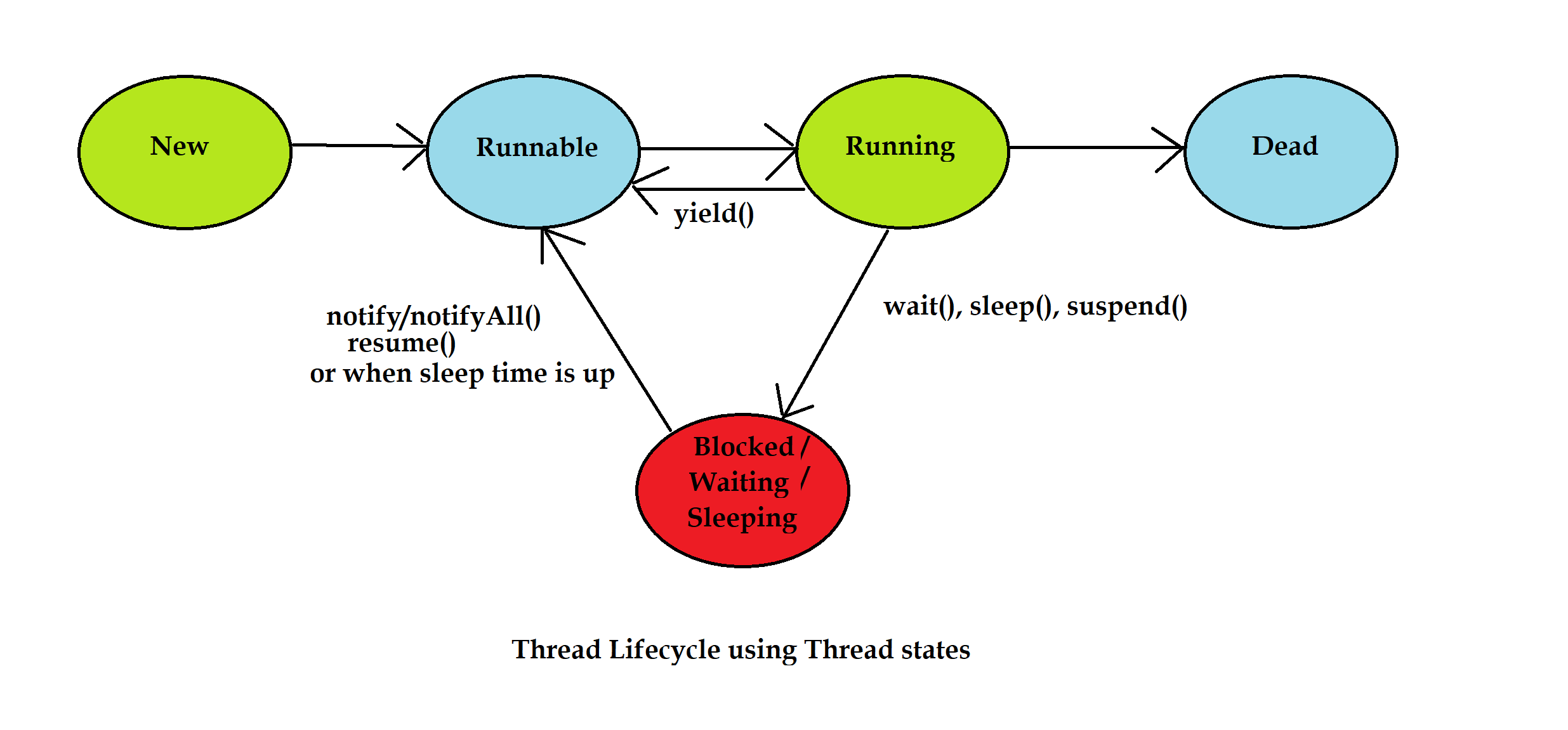
A thread life cycle describes the different states a thread goes through from creation to termination.
States of a Thread
-
New
- A thread is created but not yet started.
-
Runnable
- The thread is ready to run after calling
start().
- The thread is ready to run after calling
-
Running
- The thread is currently executing its
run()method.
- The thread is currently executing its
-
Blocked/Waiting
- The thread is temporarily inactive, waiting for a resource, lock, or another thread.
-
Terminated (Dead)
- The thread completes execution and stops.
Life Cycle Flow
New
 ↓
Runnable
 ↓
Running
 ↓
Blocked/Waiting (optional)
 ↓
Running
 ↓
Terminated
b) Explain the concept of multithreading in Java and its advantages.
Multithreading in Java is the process of executing two or more threads simultaneously within a program. A thread is a lightweight sub-process that allows multiple tasks to run concurrently. Multithreading helps improve the performance and responsiveness of applications by allowing different parts of a program to execute at the same time.
Advantages of Multithreading
- Improves Performance by executing multiple tasks concurrently.
- Efficient CPU Utilization as threads share CPU time.
- Faster Program Execution by performing tasks in parallel.
- Better Responsiveness in applications such as games and GUI programs.
- Resource Sharing since threads share the same memory space.
Example
class MyThread extends Thread {
    public void run() {
        System.out.println("Thread is running");
    }
}

public class Demo {
    public static void main(String[] args) {
        MyThread t = new MyThread();
        t.start();
    }
}
c) Implement multithreading using the Runnable interface with an example program.
   class MyThread implements Runnable {

    public void run() {
        System.out.println("Thread is running");
    }
}

public class RunnableDemo {
    public static void main(String[] args) {

        MyThread obj = new MyThread();

        Thread t = new Thread(obj);
        t.start(); // Starts the thread
    }
}
d) Write a Java program to create a thread using the Thread class.
class MyThread extends Thread {

    public void run() {
        System.out.println("Thread is running");
    }
}

public class ThreadDemo {
    public static void main(String[] args) {

        MyThread t = new MyThread();
        t.start(); // Starts the thread
    }
}
7. Explain the advantages of multithreading in Java.
done above
8. a) Explain the Runnable interface in Java.
The Runnable interface in Java is used to create and run threads. It contains a single method, run(), which defines the task that the thread will execute. A class implements the Runnable interface and provides the implementation of the run() method. An object of that class is then passed to a Thread object, and the thread is started using the start() method.
b) Write a Java program implementing the Runnable interface to create a thread.
class MyThread implements Runnable {

 public void run() {
     System.out.println("Thread is running");
 }
}

public class RunnableDemo {
 public static void main(String[] args) {

     MyThread obj = new MyThread();

     Thread t = new Thread(obj);
     t.start(); // Starts the thread
 }
}
Module 4 Important Questions (JAVA)
1. Explain Serialization and Deserialization with advantages.
Serialization is the process of converting an object into a byte stream so that it can be stored in a file or transmitted over a network. In Java, a class must implement the Serializable interface to allow serialization.
Deserialization is the reverse process of converting the byte stream back into an object.
Advantages
- Object Persistence – Objects can be saved and retrieved later.
- Data Transfer – Objects can be sent over a network.
- Easy Storage – Complex objects can be stored in files.
- Supports Distributed Applications – Helps in communication between different systems.
- Reduces Coding Effort – Entire objects can be saved and restored without manually handling each field.
2. Implement a program to read and write the data from the file.
import java.io.*;

public class FileDemo {
    public static void main(String[] args) {

        try {
            // Writing data to file
            FileWriter fw = new FileWriter("data.txt");
            fw.write("Hello Java");
            fw.close();

            // Reading data from file
            FileReader fr = new FileReader("data.txt");
            int ch;

            while ((ch = fr.read()) != -1) {
                System.out.print((char) ch);
            }

            fr.close();
        }
        catch (Exception e) {
            System.out.println(e);
        }
    }
}- Explain any three classes for file handling.
Three Classes Used for File Handling in Java
1. File
The File class is used to create, delete, and get information about files and directories.
Uses:
- Create files
- Check file existence
- Get file name and path
2. FileReader
The FileReader class is used to read data from a text file character by character.
Uses:
- Read text files
- Read character data
3. FileWriter
The FileWriter class is used to write data into a text file.
- a) Explain the role of FileReader and FileWriter classes with example program.
import java.io.*;

public class FileExample {
    public static void main(String[] args) {

        try {
            // Writing data to file
            FileWriter fw = new FileWriter("sample.txt");
            fw.write("Hello Java");
            fw.close();

            // Reading data from file
            FileReader fr = new FileReader("sample.txt");
            int ch;

            while ((ch = fr.read()) != -1) {
                System.out.print((char) ch);
            }

            fr.close();
        }
        catch (Exception e) {
            System.out.println(e);
        }
    }
}
b) Explain read(), write() and delete() functions of file with syntax and example.
1. read() Method
The read() method is used to read data from a file one character at a time.
Syntax:
int ch = fr.read();Example:
FileReader fr = new FileReader("data.txt");
int ch = fr.read();
System.out.println((char) ch);
fr.close();
2. write() Method
The write() method is used to write data into a file.
Syntax:
fw.write("text");Example:
FileWriter fw = new FileWriter("data.txt");
fw.write("Hello Java");
fw.close();
3. delete() Method
The delete() method of the File class is used to delete a file.
Syntax:
file.delete();Example:
File file = new File("data.txt");

if (file.delete()) {
    System.out.println("File deleted");
}
5. Explain Serialization and Deserialization in Java with its advantage.
done alr
6. b) Explain any three classes for file handling.
done alr
7. b) Explain any three file handling functions.
done alr
8. Write a Java program using ArrayList to perform the operations Add, Display and Remove the data.
import java.util.ArrayList;

public class ArrayListDemo {
    public static void main(String[] args) {

        ArrayList<String> list = new ArrayList<String>();

        // Add data
        list.add("Aryan");
        list.add("Rahul");
        list.add("Priya");

        // Display data
        System.out.println("ArrayList Elements:");
        System.out.println(list);

        // Remove data
        list.remove("Rahul");

        // Display after removal
        System.out.println("After Removing Rahul:");
        System.out.println(list);
    }
}- Explain the advantages of HashMap in Java.
HashMap in Java
A HashMap is a class in Java that stores data in key-value pairs. Each key is unique and is used to access its corresponding value. It is part of the Java Collections Framework.
Advantages of HashMap
-
Stores data in key-value pairs
- Makes data easy to organize and access.
-
Fast retrieval of data
- Values can be quickly accessed using their keys.
-
No duplicate keys
- Each key must be unique. If the same key is added again, the old value is replaced.
-
Dynamic in size
- It automatically grows as more elements are added.
-
Easy insertion and deletion
- Elements can be added, removed, or updated easily.
-
Allows one null key and multiple null values
- Provides flexibility in storing data.
10. Explain HashMap with its functions.
| Function | Description |
|---|---|
put(key, value) | Adds a key-value pair to the HashMap. |
get(key) | Returns the value associated with the given key. |
remove(key) | Removes the key-value pair for the specified key. |
containsKey(key) | Checks whether a key exists in the HashMap. |
size() | Returns the number of elements in the HashMap. |
clear() | Removes all elements from the HashMap. |
11. Write a Java program using ArrayList to store at least three students details and display them using an Iterator.
import java.util.ArrayList;
import java.util.Iterator;

public class StudentList {
    public static void main(String[] args) {

        ArrayList<String> students = new ArrayList<>();

        // Adding student details
        students.add("101 - Aryan");
        students.add("102 - Rahul");
        students.add("103 - Priya");

        // Displaying using Iterator
        Iterator<String> it = students.iterator();

        System.out.println("Student Details:");
        while (it.hasNext()) {
            System.out.println(it.next());
        }
    }
}- a) Compare ArrayList and LinkedList in the Java Collections Framework with its advantages.
Both ArrayList and LinkedList are classes in the Java Collections Framework used to store multiple elements.
| ArrayList | LinkedList |
|---|---|
| Uses a dynamic array. | Uses a doubly linked list. |
| Faster for accessing elements. | Slower for accessing elements. |
| Insertion and deletion are slower. | Insertion and deletion are faster. |
| Uses less memory. | Uses more memory due to links between nodes. |
| Best for frequent searching. | Best for frequent insertion and deletion. |
Advantages of ArrayList
- Fast random access using index.
- Less memory usage.
- Easy to traverse.
- Suitable for storing and retrieving data frequently.
Advantages of LinkedList
-
Fast insertion and deletion of elements.
-
No need to shift elements during insertion or deletion.
-
Efficient when data changes frequently.
-
Can be used to implement queues and stacks.
-
a) Discuss the advantages of HashMap in Java. Write a program to store and display key–value pairs.
import java.util.HashMap;

public class HashMapDemo {
    public static void main(String[] args) {

        HashMap<Integer, String> map = new HashMap<>();

        // Storing key-value pairs
        map.put(101, "Aryan");
        map.put(102, "Rahul");
        map.put(103, "Priya");

        // Displaying key-value pairs
        System.out.println("Student Details:");

        for (Integer key : map.keySet()) {
            System.out.println(key + " : " + map.get(key));
        }
    }
}
Module 5 Important Questions (JAVA)
1. Explain components of event handling.
Event handling is the mechanism that controls events generated by user actions such as button clicks, key presses, and mouse movements.
Components of Event Handling
-
Event Source
- The object that generates the event.
- Example: Button, TextField, CheckBox.
-
Event Object
- Contains information about the event that occurred.
- Example:
ActionEvent,MouseEvent,KeyEvent.
-
Event Listener
- An interface that receives and handles events.
- Example:
ActionListener,MouseListener,KeyListener.
Example
Button b = new Button("Click");

b.addActionListener(new ActionListener() {
    public void actionPerformed(ActionEvent e) {
        System.out.println("Button Clicked");
    }
});
2. Explain any five swing components.
| Component | Purpose |
|---|---|
JLabel | Displays text or images |
JButton | Creates a button |
JTextField | Accepts text input |
JCheckBox | Selects multiple options |
JRadioButton | Selects one option from a group |
3. Write the steps to connect a Java program to a database using JDBC.
- Import JDBC packages
- Load JDBC driver
- Establish connection
- Create statement
- Execute query
- Process results
- Close connection
4. Write a Java program using Swing to create a simple GUI with a button and text field.
skip ig
5. Explain JDBC drivers.
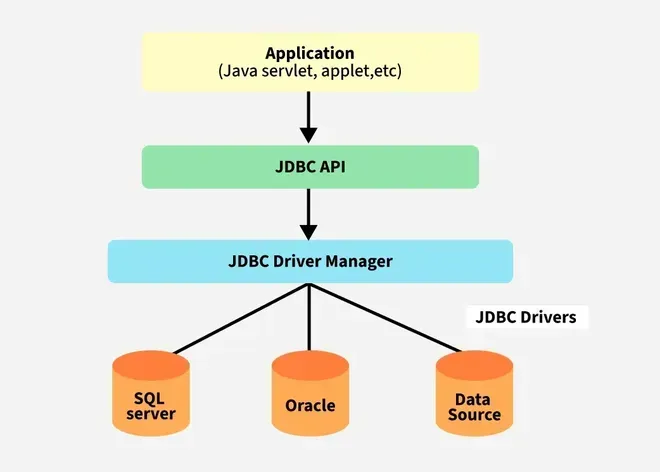
A JDBC (Java Database Connectivity) Driver is a software component that enables a Java application to communicate with a database. It acts as a bridge between the Java program and the database.
Types of JDBC Drivers
-
Type 1 – JDBC-ODBC Bridge Driver
- Uses ODBC drivers to connect to databases.
- Not commonly used now.
-
Type 2 – Native API Driver
- Uses database-specific native libraries.
- Faster than Type 1.
-
Type 3 – Network Protocol Driver
- Sends requests to a middleware server, which communicates with the database.
-
Type 4 – Thin Driver
- Directly connects Java applications to the database.
- Most commonly used because it is fast and platform-independent.